
- Home
- Electronics
- The New HP OmniBook 5 AI PC: The Laptop Designed For Multitaskers, Creators & Future Builders
The New HP OmniBook 5 AI PC: The Laptop Designed For Multitaskers, Creators & Future Builders
Aarohy Kapoor / Updated: Nov 2, 2026, 12:04 IST
Comments
Share
Aa
PrintText Size
- Small
- Medium
- Large
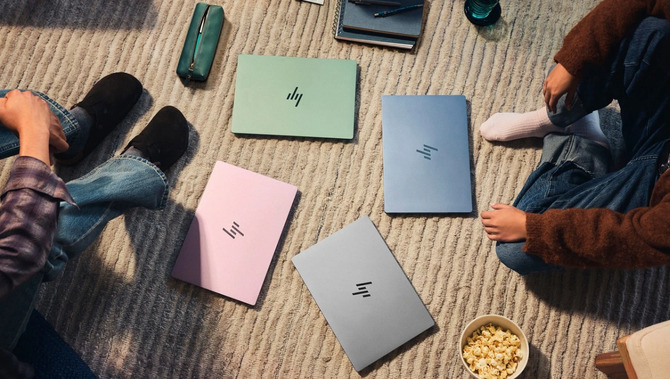
College assignments, presentations, online classes, coding projects and content creation. A laptop today has to keep up with quite a few things, sometimes all at once. For students and young professionals, it is no longer just a device that comes out when there is work to finish. It is where ideas take shape, new skills are learnt, and side projects get their first shot. And if it is something you carry to class, work with at a cafe or keep on your desk every day, you would also want to ensure that the laptop looks good.That is the space HP is looking to tap into with its new OmniBook 5 AI PC laptop. With four colour options and a focus on everyday versatility, the laptop brings personal style into a category often dominated by discussions around processors, memory and benchmarks. But a laptop cannot survive on looks alone. For someone juggling college, work and creative projects, the real question is whether it can keep up with their routine. Here is all that you would want to know about the OmniBook 5 laptop and how it would match your requirements as a Gen Z student or a young professional:Not everyone wants their laptop to look like every other device in the room. Some prefer a clean, understated finish, while others would rather have something that stands out on a college desk or complements their everyday accessories. After all, Gen Z does not want to compromise on aesthetics. The new HP OmniBook 5 AI PC offers four colour options, each with a different aesthetic. The new HP OmniBook 5 AI PC range starts at ₹79,999/- with exciting offers. Book online or at any laptop store near you.
The choices give buyers a little more room to find something that feels like them. But it is important to understand that the design is not going to decide whether a laptop can handle a demanding project, of course. But when a device is part of your everyday life, you cannot ignore the looks.Here is a look at the main specifications announced for the 14-inch HP OmniBook 5. But it is important to understand that the specifications vary by configuration and you must check out model details on Amazon before making your purchase.
The cinematic OLED display is great for people who spend hours looking at documents, watching videos or working on visual content. The 14-inch size also makes the laptop worth considering for those who want a screen for everyday work without carrying a larger device. The up-to-42-hour battery figure is based on local video playback under specific test conditions, but the actual life will depend on your screen settings and usage.The modern student is not necessarily just attending classes and submitting assignments. They could also be learning graphic design, editing short videos, building a portfolio or experimenting with their first app. Young professionals, meanwhile, may be balancing office work with freelance projects or a creative pursuit outside working hours. For aspiring creators, a laptop for video editing and design needs to offer more than a good-looking exterior. Display quality, processor performance, memory and storage all influence the experience. The same applies to students learning to code or aspiring developers building their first applications. A laptop for coding and creativity should match the tools involved, whether that means learning the basics or running several development applications together.The new HP OmniBook 5 AI PC is positioned for this mix of users. Its processor and memory options provide a starting point for users looking for a laptop for everyday needs, but people working with complex creative projects should not assume that every variant will be suitable for professional-level editing or development.If your laptop use mostly involves browsing, documents, online classes and everyday tasks, 8GB RAM should be enough. If you regularly keep several applications open or plan to use more demanding creative tools, the 16GB variant should be your choice.The new HP OmniBook 5 AI PC brings a lifestyle angle to a familiar buying decision. Its four colour options let students and young professionals choose a finish that suits their personality, while its cinematic OLED display and choice of processor and memory configurations give buyers more to consider beyond the design. A laptop can look good on your desk. The real win is finding one that fits the life happening around it.Availability:The new HP OmniBook 5 AI PC range starts at ₹79,999/- with exciting offers. Book online or at any laptop store near you.What colours are available for the new HP OmniBook 5?The listed colour options are Soft Honeydew, Peony Pink, Starlit Blue and Smoke Silver.What are the key specifications of the HP OmniBook 5?The 14-inch model offers a cinematic OLED display with 1920 x 1200 resolution, an Intel Core 5 320 processor in the Intel Core 5 Series 3 family, 8GB or 16GB RAM configurations and SSD storage options. Specifications vary by variant.Is the HP OmniBook 5 suitable for students?It is positioned for students and young consumers. Its suitability depends on the chosen configuration and whether it meets the requirements of the applications used for classes, assignments and projects.Is the HP OmniBook 5 suitable for content creation?It may suit everyday creative tasks, but demanding video editing and professional design workloads require checking the processor, memory, display and graphics capabilities of the exact model.Should I choose 8GB or 16GB RAM?The 8GB variant may suit everyday computing, while 16GB may be preferable for heavier multitasking and compatible creative applications. Your software requirements should guide the decision.I want a laptop that looks premium and is easy to carry but is still powerful. Is the HP OmniBook 5 a good option?The HP OmniBook 5 could be worth considering if you want a lightweight laptop that looks different from the usual silver-and-black models. It weighs approximately 1.16kg and comes in four colours: Soft Honeydew, Peony Pink, Starlit Blue and Smoke Silver. You get an Intel Core 5 320 processor in the Intel Core 5 Series 3 family, depending on the configuration. However, the right variant depends on the applications you plan to use.I do internships and freelance work on the side. Can the HP OmniBook 5 handle both?The HP OmniBook 5 is designed for everyday computing, making it worth considering for tasks such as preparing presentations, managing documents, attending online meetings and working on personal projects. If your freelance work involves heavier creative applications or several demanding programs running together, consider the 16GB RAM variant and check whether the processor and graphics meet your requirements.I'm a design student on a tight budget. Does the HP OmniBook 5 offer a good screen and battery life?The 14-inch cinematic OLED display with a 1920 x 1200 resolution is one of the features to consider if your coursework involves visual content, presentations or design projects. HP also claims up to 42 hours of local video playback battery life*, although actual battery life will vary with usage and settings. Before buying, compare the price of the available configurations and check whether the graphics and memory can handle your design software.I want a laptop for presentations, Netflix and a bit of gaming. Should I consider the HP OmniBook 5?The HP OmniBook 5's 14-inch cinematic OLED display and lightweight design make it worth considering for presentations, streaming and everyday use. However, it uses integrated Intel Graphics, so it may not be the right choice for demanding games. Check the requirements of the games you play before choosing a configuration.Is the HP OmniBook 5 a good laptop for students who want to learn coding and build projects?The HP OmniBook 5 offers an Intel Core 5 320 processor in the Intel Core 5 Series 3 family, along with 8GB or 16GB RAM configurations, depending on the variant. These options give students a starting point for learning programming, working on assignments and building projects. If you expect to run multiple development tools or work on more demanding projects, the 16GB variant is worth considering. Check the requirements of your coding tools before making a decision.*Battery life tested by HP using continuous FHD video playback, 1080p (1920x1080) resolution, 200 nits brightness, system audio level at the image default, player audio level at 100%, played full-screen from local storage, headphones attached or through speaker (if no audio jack port), wireless on but not connected. Actual battery life will vary depending on configuration, and maximum capacity will naturally decrease with time and usage.
A laptop that matches your style
| Colour | The look |
| Soft Honeydew | Fresh and subtle |
| Peony Pink | Playful and expressive |
| Starlit Blue | Contemporary and versatile |
| Smoke Silver | Classic and understated |
New HP OmniBook 5 AI PC: Key specifications
| Specification | Details |
| Display | 14-inch cinematic OLED, 1920 x 1200 resolution |
| Processor | Intel Core 5 320 processor in the Intel Core 5 Series 3 family |
| RAM | 8GB or 16GB at launch; availability varies by variant |
| Storage | 256GB or 512GB SSD options at launch |
| Graphics | Integrated Intel Graphics |
| Operating system | Windows 11 |
| Colours | Soft Honeydew, Peony Pink, Starlit Blue, Smoke Silver |
| Battery life | Up to 42 hours of local video playback, as claimed by HP* |
| Charging | 65W USB Type-C GaN charger |
| Weight | Approximately 1.16kg |
| Design | Slim profile and 180-degree hinge |
From creating content to building your next big idea
Which HP OmniBook 5 variant should you choose?
FAQs

About the AuthorAarohy Kapoor
End of Article

quick links
Best Split ACBest i5 LaptopsSide By Side Door RefrigeratorsTouch Screen Laptops750 Watt Mixer Grinder32 Inch Smart TV500GB hard diskTablets under 12000Hydraulic Storage BedsRunning machinesBeard Trimmer for MenJeggings for womenCo-ord sets for womenHybrid Smartwatches for menBest Smartwatch Under 1500Over-ear headphones13 inch laptopsPortable hotspot devicesHarmonium for beginnersBass guitarsBest Gaming HeadphonesBest VR HeadsetsCar UmbrellasBest Stretch Mark Creams and OilsGirls’ bicyclesWicket keeper glovesHardsided trolley bagsBackpack for womenBackpack for menWeight loss teaOrganic turmeric powderBest Kitchen chimney in IndiaLCD writing tablet2TB Hard DiskWireless earphones under 1000Bluetooth earbudsAir Conditioner9kg Washing Machines65 Inch TVVacuum CleanersBest Water PurifiersBest AC In IndiaAutomatic Washing MachineBest AC Under 20000
Copyright © 2026 Bennett, Coleman & Co. Ltd. All rights reserved. For reprint rights: Times Syndication Service