
Build the Perfect Gaming Setup: Gaming Accessories You Can’t Miss
Impulse purchases and blinding RGB do not make a great gaming setup. It is made on comfort, performance and knowing what really enhances your experience. Whether it be responsive keyboards and precision-driven mouse, and cooling systems that ensure no performance drops off, all accessories make a difference. This article tells you the basics from the most practical perspective and helps you to make your coolest dream gaming setup.
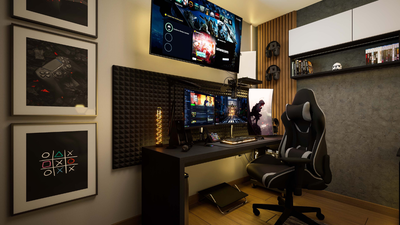
When we give it a second thought, gaming setups are not about the game; they are about the experience you get with it. It is where time bends a little, and where every single game becomes of hours easily, and basically, a true and dedicated player spends most of their time. So, this place is a dome of worship. And for creating this space, you need to be very strategic. One should not build it emotionally or be influenced by products you see on Instagram or on live streams. If you just set up some flashy keyboards in a random room, it will look vague. Impulsively, you will buy all the things, but it will not come together. Thus, it is suggested to think smartly. Put up good furniture and room feel, followed by getting the best of the best gadgets out there. And when you are in India, there are more layers, like budget, limited space, and heat. These are not trivial problems. Start investing in affordable products, solve a problem and look aesthetically ecstatic. Here is our layout and idea of how you can achieve the best gaming setups, by products available on Flipkart.
Step 1: Understand What Actually Improves Game SessionJust before buying anything, you need to understand one simple thing: that any accessories are not just aesthetic and blingy RGB lights everywhere. Yes, it is very important to have those lights and setup, as you see in the videos of your favourite streamers and YouTubers. But it is very important to invest in performance-loaded gadgets that make all the renovations worth it if your gameplay is smooth and you win one battle after another. Game accessories such as a high-precision mouse and a responsive keyboard directly improve gameplay in terms of speed, accuracy, and reaction time. Here is where individuals become misguided. They presume that better always implies costly. It does not. A starting set-up with the proper necessities will always be more comfortable than a costly set-up with chance picks.Start by asking yourself:It will all depend on your answers.Step 2: The Keyboard Is Your First Real InvestmentA keyboard is not something that you press. It is an experience that you live with. When you play for hours, your fingers, wrists, and even your posture rely on it. There are three main types of keyboards that you can buy, as per your budget and feasibility. When you are only setting up, you do not need to take a dive into mechanical keyboards. An easy, easy-to-play keyboard that will always work is sufficient. Such are the types of keyboards you do not chew on. You plug them in, and it works, and you gradually know what you want next.Who this is for:Novices, amateur players or anyone who is dipping their toes in without investing further.Recommended Picks: This is where things change. Mechanical keyboards give you tactile feedback, faster responses, and a longer lifespan, often lasting years compared to membrane keyboards that wear out faster. But more importantly, they feel different, yes, a little bit more on the techie side with more responsiveness. Who this is for:Regular gamers, FPS players, and anyone who wants better control and feel.Recommended Picks: This type if keyboards is not so much about performance features but rather how your space feels. No wires and less clutter, and you also get a lot of flexibility. The wireless installations can save a lot of space in small Indian rooms where there is a scarcity of space on the desks. But make it usable; charge and connection are important.Who this is for:Low-key setups, students and/or those fed up with cable mess.Recommended Picks: People need to understand their preferred method of mouse choice. All you need to understand is that a good mouse should have good grip comfort and excellent hand-size compatibility. Also, a mouse which operates at a higher DPI will cause less work than a mouse which operates at a lower DPI.Recommended mouses: Even high-quality sources emphasise that cooling may be necessary when gaming or multitasking, such as when streaming demand is high. To desktop users, cabinets can be used to manage airflow. Something like the ZEBRONICS LED Mid Tower Cabinet not only improves ventilation but also adds a subtle aesthetic touch.Recommended cooling solutions: Wireless Setup Gives:Hybrid Setups:But here is the real insight. A hybrid setup works best. Try entire gaming sets like the Ant Esports MG401 Combo Set. The keyboard and mouse that come with is wired, but you can also pair them via Bluetooth. And the size is also so compact that it doesn’t feel like a wired setup. It is simple, affordable, and gives you both a keyboard and a mouse in one go. For beginners or casual gamers, this kind of combo makes sense. Don’t overthink it; just start playing with no perfection at all, but with consistency. When your setup feels easy to use, you will naturally spend more time gaming, and that is where you understand what you actually need next.
Gaming Accessories on Flipkart, to set up a fun gaming space in homes:
Step-by-Step Guide to Put the Above Products in a Proper Setup
- What are your types of games?
- What is your average playing time?
- Do you experience discomfort following sessions?
- Budget & Beginner Keyboards
- Mechanical Keyboards
- Wireless Keyboards
Step 3: The Mouse Is Where Precision LivesThe keyboard handles control-based tasks while the mouse operates through instinctive behaviour. An excellent gaming mouse is not a device. The mouse functions as if it were a part of your hand. Research on gaming ergonomics demonstrates that smoother surfaces and better control of the mouse enhance accuracy and minimise errors when it comes to making rapid motions. A good mouse surface sees that even this minor detail functions as a crucial element.Now, coming to actual mouses:
- The Logitech G102 entry-level gaming mouse demonstrates high stability according to its users. This one provides you with easy control, which enables you to perform precise tasks at a consistent level.
- The Logitech G304 allows users to connect wirelessly while maintaining the same performance level which users experience with wired connections.
Step 4: Cooling Is the Most Underrated Upgrade to MakeThis is where aesthetics are transformed into the practical. Gaming generates heat. A lot of it. And when your system overheats, it has what is referred to as thermal throttling. This is the point your device slows to avoid harm, causing the lag, frame drops and unstable gameplay. The given problem is not exceptional. This is very widespread, particularly in laptops. Cooling devices, such as Cosmic Bytes Meteroid Cooling Pad, can be used to keep air flowing and prevent heat accumulation.A cooling pad will help with the following:
- Prolong the life of devices
- Have stable frame rates
- Feel more comfortable in lengthy sessions
Step 5: Decide whether you want Wired or Wireless AccessoriesThis debate is everywhere, but the answer depends on your lifestyle and your desk habits. Wired Setup Gives:
- More reliable
- No charging needed
- Usually cheaper
- Cleaner desk
- More flexibility
- Better for small spaces
Step 6: Now Comes the Aesthetic & Ecstatic FeelThis is where most people get carried away. RGB lights, colour themes, and matching accessories. It all looks beautiful, but it can also become unnecessary if you are not careful.A cabinet with soft lighting adds enough visual interest. A keyboard with backlighting gives your setup personality without being overwhelming. Your setup should feel like a space you want to sit in, not a showroom display. Think of it this way. If you turn off all the lights and just play, does your setup still feel good? If yes, you have done it right.Step 7: Focus on Making Long-Term ChangesThis is the most significant point of view. Gaming setup is not about how it will appear in five minutes. It is concerning the feeling after five hours. Ask yourself questions that tally with your profession, your health and how you perceive things around you. Just for an example, if you are okay with sitting on a regular chair and yet giving your best performance in games, or if your audience doesn't care about your setup, then so be it. But, if you're aiming for a professional lifestyle that entices you and your audience, then you should get yourself a gaming chair. These are not radical improvements, but they transform the way you play on a daily basis.Step 8: Spend WiselyWhen assembling a setup, it is quite easy to spend a lot of money. You can see the influencers who use very costly equipment, and it makes you feel like you have to be at that level. The truth is quite the contrary. Nothing can be more gratifying than a budget-built balanced setup. But one will always suggest you invest in good machines more than furniture and the environment around you.Bit by bit, your setup changes. The idea is not to construct it all at once. It is to create a home that will expand alongside you.Step 9: Recognise Your Gaming StyleNot all gamers require the same setup. Your mouse is more important if you play FPS games. A full-size keyboard could be a good fit, particularly in a system that is used by the user both at work and as a source of entertainment. A small keyboard is good for games that are fast. When you play RPGs or strategy games, it matters to you how comfortable your keyboard is. Your configuration layout is important in case you are a streamer or a multitasker.Step 10: Monetise Your SetupOnce your setup starts feeling like you, don’t stop at just playing. Start using it. Record your gameplay, share clips, stream occasionally, or even review the gear you own. You don’t need to be famous. You just need to be consistent and honest. Over time, your setup becomes your identity. People notice your style, your space, your voice. That’s when small brand collaborations, affiliate links, or content opportunities start coming in. It’s not about chasing money. It’s about letting something you already enjoy slowly open doors for you.Final ThoughtsBuilding a gaming system is not about being perfect but having an intention. All accessories must address a problem or enhance your experience. When it does not, then you most likely do not need it. The most important thing is that, at the end of the day, the best gaming environment is the one that will not make others envious.Other Related Stories:Top Headphones & Headsets Under 1999 Available on FlipkartASUS ExpertBook P1 Core 5 Laptop Review: Is It Worth Buying in 2026?

About the AuthorAshna Ali
End of Article

quick links
Best Split ACBest i5 LaptopsSide By Side Door RefrigeratorsTouch Screen Laptops750 Watt Mixer Grinder32 Inch Smart TV500GB hard diskTablets under 12000Hydraulic Storage BedsRunning machinesBeard Trimmer for MenJeggings for womenCo-ord sets for womenHybrid Smartwatches for menBest Smartwatch Under 1500Over-ear headphones13 inch laptopsPortable hotspot devicesHarmonium for beginnersBass guitarsBest Gaming HeadphonesBest VR HeadsetsCar UmbrellasBest Stretch Mark Creams and OilsGirls’ bicyclesWicket keeper glovesHardsided trolley bagsBackpack for womenBackpack for menWeight loss teaOrganic turmeric powderBest Kitchen chimney in IndiaLCD writing tablet2TB Hard DiskWireless earphones under 1000Bluetooth earbudsAir Conditioner9kg Washing Machines65 Inch TVVacuum CleanersBest Water PurifiersBest AC In IndiaAutomatic Washing MachineBest AC Under 20000
Copyright © 2026 Bennett, Coleman & Co. Ltd. All rights reserved. For reprint rights: Times Syndication Service